 |    | |
Home > Online Help > Audio Editor > Audio Editor Activation
This tutorial explains how easily can activate DJ Audio Editor with just couple of clicks.
After purchasing DJ Audio Editor we'll send you the Activation Code as soon as we receive payment confirmation from our e-commerce reseller.
 The activation code is a long sequence of letters and numbers that can be easily confused when typed. If you typed this information manually from your confirmation email, it is possible that errors may have been entered into the proper field of the Activation screen. Therefore, it is recommended that you "Copy and Paste" this information from your confirmation email onto the Activation screen.
Step 1: Take Some Precautions
Please make sure you have downloaded the latest version of DJ Audio Editor, then logged on to your computer as Administrator, and also your computer is connected to the Internet.
Download Now
How to Activate DJ Audio Editor
This tutorial explains how easily can activate DJ Audio Editor with just couple of clicks.
After purchasing DJ Audio Editor we'll send you the Activation Code as soon as we receive payment confirmation from our e-commerce reseller.
The activation code is a long sequence of letters and numbers that can be easily confused when typed. If you typed this information manually from your confirmation email, it is possible that errors may have been entered into the proper field of the Activation screen. Therefore, it is recommended that you "Copy and Paste" this information from your confirmation email onto the Activation screen. Step 1: Take Some Precautions
Please make sure you have downloaded the latest version of DJ Audio Editor, then logged on to your computer as Administrator, and also your computer is connected to the Internet.
Download Now





Step 2: Load the Activation Form

To open the activation form and activate your license of DJ Audio Editor, click on Help menu in the menu bar of software and choose Activate. Step 3: Enter Your Activation Code
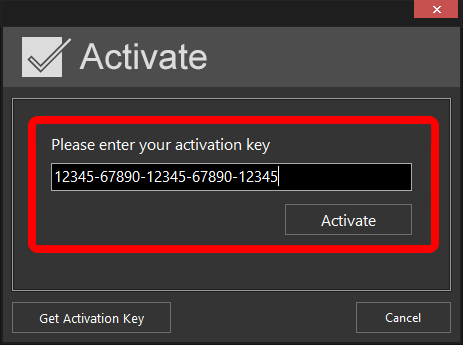
Find your activation code inside of order confirmation email which has been sent via our e-commerce reseller just a moment after your purchase got confirmed.Select the entire code, copy and paste onto the Activation Form. Then click Activate.
Step 4: Activate DJ Audio Editor
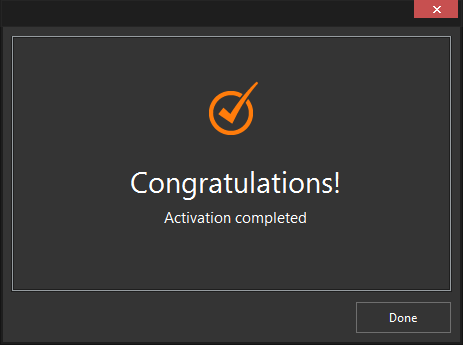
After entering your activation code successfully, software will show a confirmation message and Program4Pc DJ Audio Editor becomes fully activated. That's it!
Your license of DJ Audio Editor is now activated and you can enjoy editing your audio files without limitation.
Download DJ Audio Editor
Your license of DJ Audio Editor is now activated and you can enjoy editing your audio files without limitation.
See what else Program4Pc Audio Editor can do for you:
- Edit audio file
- Trim audio file
- Merge audio files
- Edit audio CD tracks
- Apply effects on audio file
- Use filters on audio file
- Record audio
- Create ringtone for iPhone
- Edit audio tag