 |    | |
Home > Online Help > Audio Editor > Edit Audio
This tutorial explains how easily you may edit audio with just couple of clicks.
Do you want to easily edit audio? With Program4Pc DJ Audio Editor, it takes just a few steps to edit audios from MP3, WAV, WMA, OGG or any video's audio like AVI, MP4, MOV, DVD and other formats.
Just follow the steps below to see how easy editing audio can be. Just run the program, open an audio, edit and save.
Step 1: Download and Install Audio Editor Software
Download Now
How to Edit Audio File
This tutorial explains how easily you may edit audio with just couple of clicks.
Do you want to easily edit audio? With Program4Pc DJ Audio Editor, it takes just a few steps to edit audios from MP3, WAV, WMA, OGG or any video's audio like AVI, MP4, MOV, DVD and other formats.
Just follow the steps below to see how easy editing audio can be. Just run the program, open an audio, edit and save.
Step 1: Download and Install Audio Editor Software
Download Now





Step 2: Add the Audio Files You Want to Edit

 Open Program4Pc Audio Editor and click the Open button to select audios for editing and they will appear in the list of source files. Or just drag and drop audio files into the program.
 Step 3: Start Editing Audio Files
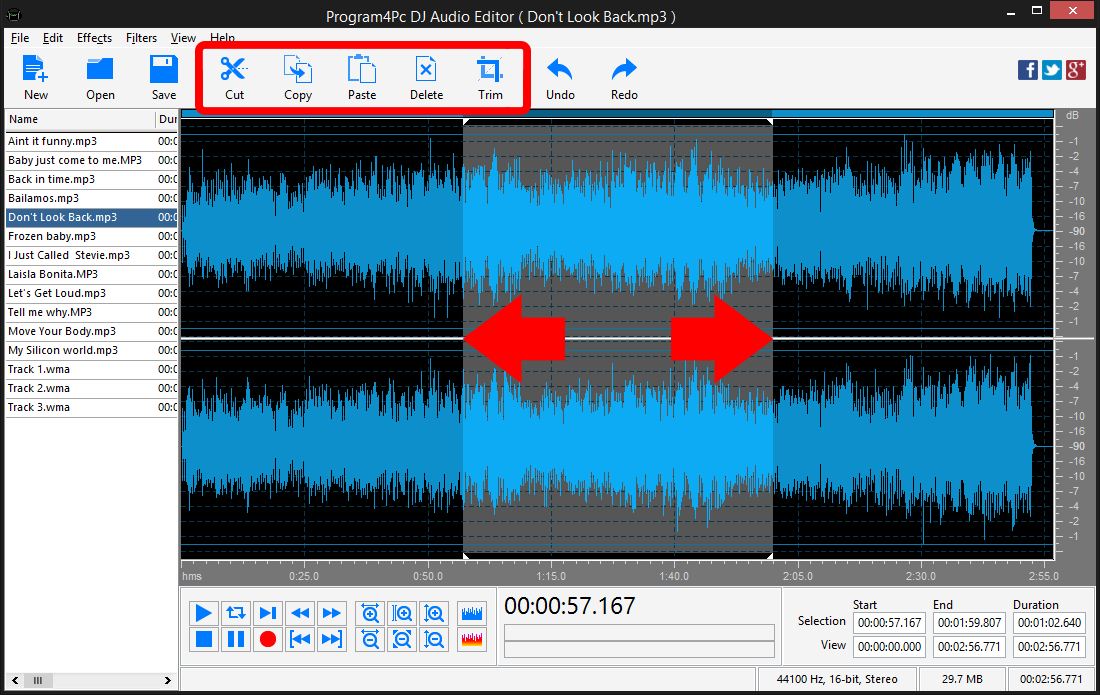
Click on audio file will open and show its waveform which provides you unlimited audio editing options. If you need to enhance or edit a portion of audio then select it by clicking within the Waveform Display and without releasing the left mouse button, move the cursor to the left or right to make a selection (when done, release the mouse button). Then use upper menu buttons to Cut or Copy that section. Also Trim audio and remove unwanted parts.
Step 4: Apply Effects and Filters on Audio Files
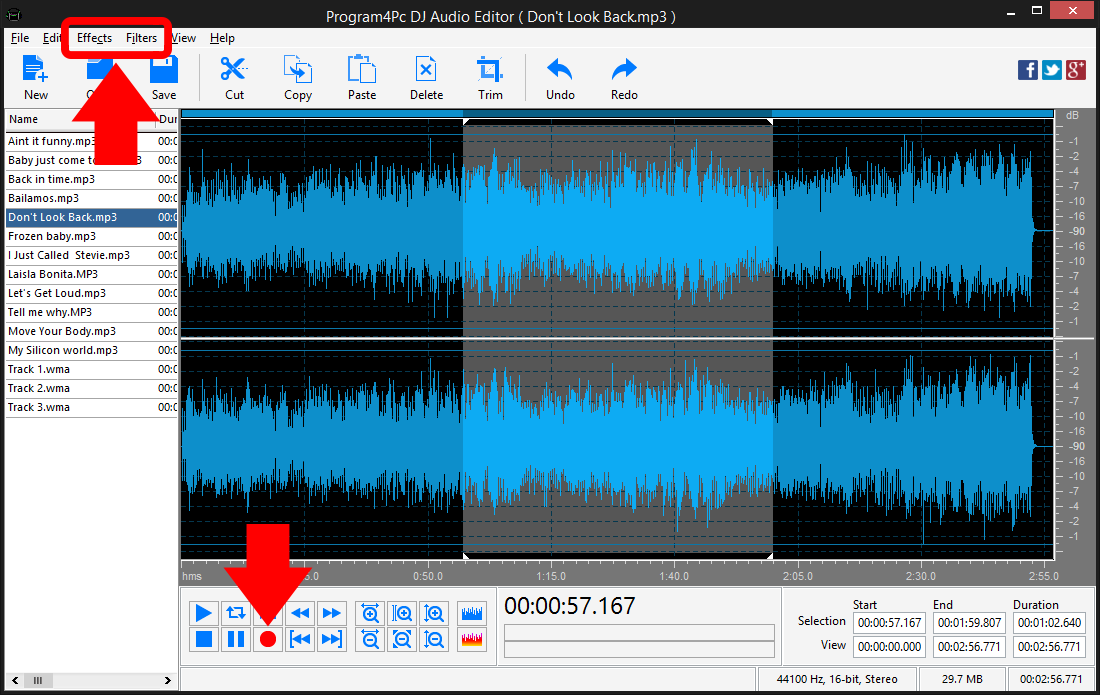
From Effects and Filter drop-down menus on top if program's interface choose your desire effects and filters to apply. Zoom in/out the selected area to adjust your selections and see more details of audio from lower part of program. If you need to record audio then use recorder button to fulfill this task easily.
Your options to work on audio files are limitless and you can do whatever you like to edit, enhance and customize audio file.
Step 5: Set the Output Format and Save Edited Audio
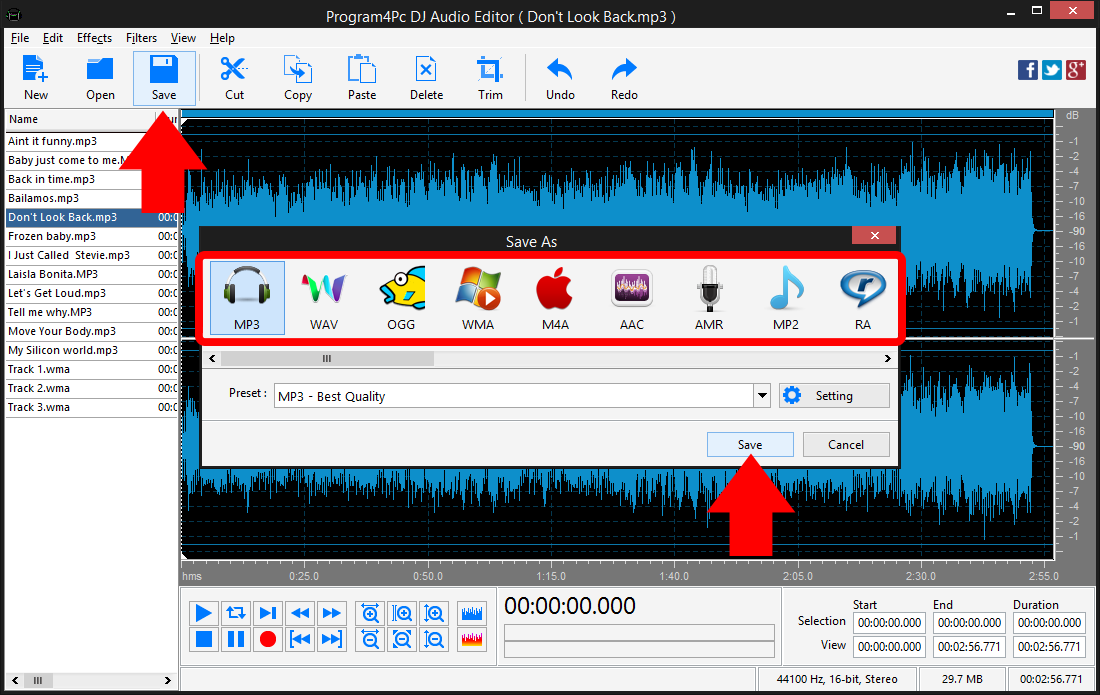
Now it's time to save your edited audio, click the Save button and select the audio format from the list. Click on Preset drop-down menu to expand the preset list and choose one that best suits your needs. Finally click Save and choose the folder in which to place the edited files by either selecting the default folder or choose a different one.
That's it!
It is simple as 1-2-3. Now you know how to edit any audio formats with ease! Program4Pc DJ Audio Editor provides editing tools and enables you to enhance and customize audio file professionally.
Download Audio Editor
It is simple as 1-2-3. Now you know how to edit any audio formats with ease! Program4Pc DJ Audio Editor provides editing tools and enables you to enhance and customize audio file professionally.
See what else Program4Pc Audio Editor can do for you:
- Trim audio file
- Merge audio files
- Edit audio CD tracks
- Apply effects on audio file
- Use filters on audio file
- Record audio
- Create ringtone for iPhone
- Edit audio tag