 |    | |
Home > Online Help > Video Converter > WMV Converter
This tutorial explains how easily can convert your WEBM files to WMV format with just couple of clicks.
To convert your favorite movies to WMV, use Program4Pc Video Converter. This Windows software is not just a perfect WMV Converter, but a powerful tool to manage your multimedia files. Convert them between more than 300 formats and devices as simple as 1-2-3.
Step 1: Install Program4Pc WEBM to WMV Converter
Download Now
How to Convert WEBM to WMV
This tutorial explains how easily can convert your WEBM files to WMV format with just couple of clicks.
To convert your favorite movies to WMV, use Program4Pc Video Converter. This Windows software is not just a perfect WMV Converter, but a powerful tool to manage your multimedia files. Convert them between more than 300 formats and devices as simple as 1-2-3.
Step 1: Install Program4Pc WEBM to WMV Converter
Download Now





Step 2: Open WEBM Files You Wish to Convert

 Click Add Files and add the video or videos that you want to convert to WMV or any other format. With Program4Pc Video Converter you can convert your whole media library in just a couple of clicks.
 Step 3: Choose WMV Preset
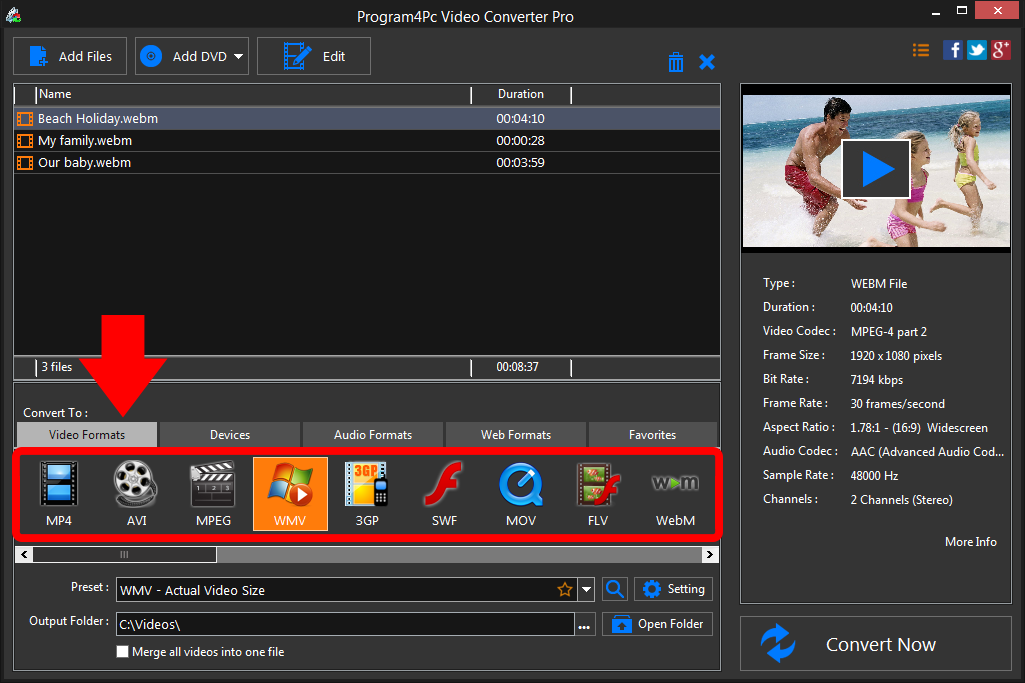
For converting your video to a specific media file format, select the output format by choosing WMV format presets. But if you want to create a video that will play on a mobile device - smartphone, tablet, or media player. Then choose the appropriate ready-made preset from Devices presets. Step 4: Choose Output Folder and Start Conversion
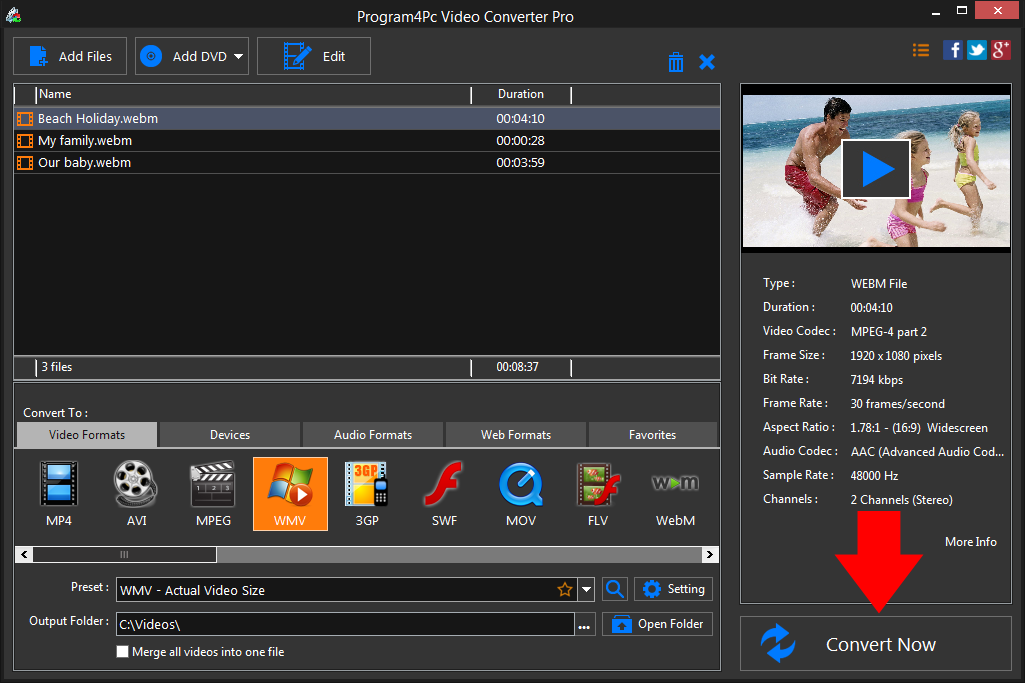
All converted files are saved by default to the specific folder. If you want to change the default folder, click the Browse button next to the Output Folder field and choose an existing folder or create a new one. Now click Convert Now. After the conversion is done, you may open the output folder and play the converted files. That's it!
Now you know how to convert videos to WMV and change the format of your videos with ease! Program4Pc Video Converter can also be used to transfer files between hundreds of other formats and mobile devices, including iPhone 5, iPad, Samsung Galaxy S5, Nokia, Motorola, Nexus and many more. Additionally, Program4Pc Video Converter provides editing tools and enables you to customize and enhance your video file.
Download Video Converter
Now you know how to convert videos to WMV and change the format of your videos with ease! Program4Pc Video Converter can also be used to transfer files between hundreds of other formats and mobile devices, including iPhone 5, iPad, Samsung Galaxy S5, Nokia, Motorola, Nexus and many more. Additionally, Program4Pc Video Converter provides editing tools and enables you to customize and enhance your video file.
See what else Program4Pc Video Converter can do for you:
- Convert WEBM to MP4
- Convert WEBM to AVI
- Convert WEBM to MPEG
- Convert WEBM to 3GP
- Convert WEBM to SWF
- Convert WEBM to MOV
- Convert WEBM to FLV
- Convert WEBM to M2TS