 |    | |
Home > Online Help > Audio Converter > Audio CD Ripper
This tutorial explains how easily you may rip and convert audio CD tracks with just couple of clicks.
Edit and convert audio CD tracks is a difficult task because audio CD file format is not recognizable by audio programs by itself and need to be changed to another format. Program4Pc Audio Converter is equipped with an advanced audio CD ripper tool to read and extract digital audio tracks directly from audio CD and import them into conversion list.
Process of ripping audio CD is quick and easy, simply download Program4Pc Audio Converter and follow below steps to have all your audio CD tracks as separate files.
Step 1: Install Program4Pc Audio Converter Pro
Download Now
How to Rip Audio CD
This tutorial explains how easily you may rip and convert audio CD tracks with just couple of clicks.
Edit and convert audio CD tracks is a difficult task because audio CD file format is not recognizable by audio programs by itself and need to be changed to another format. Program4Pc Audio Converter is equipped with an advanced audio CD ripper tool to read and extract digital audio tracks directly from audio CD and import them into conversion list.
Process of ripping audio CD is quick and easy, simply download Program4Pc Audio Converter and follow below steps to have all your audio CD tracks as separate files.
Step 1: Install Program4Pc Audio Converter Pro
Download Now





Step 2: Open an Audio CD for Conversion
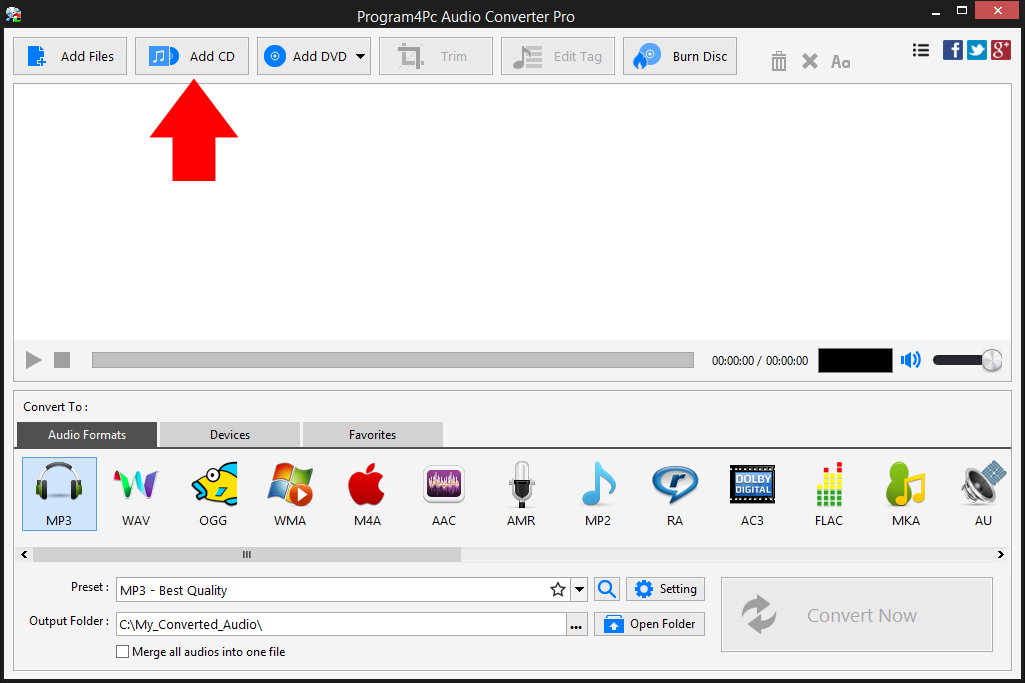
 In order to load audio CD tracks into the software, open Program4Pc Audio Converter and insert audio CD in optical drive then click the Add CD button on top of program's interface.
 Step 3: Insert CD and Select Audio Tracks

In newly opened window, from Select the CD drive drop-down menu choose proper optical drive which has the CD inside (if your computer has more than one CD/DVD drive). All audio tracks will be listed automatically, by default all tracks has been checked but you may uncheck them if do not need them to be ripped. Then click the Add to list button.
Step 4: Choose Output Format and Folder to Start Conversion
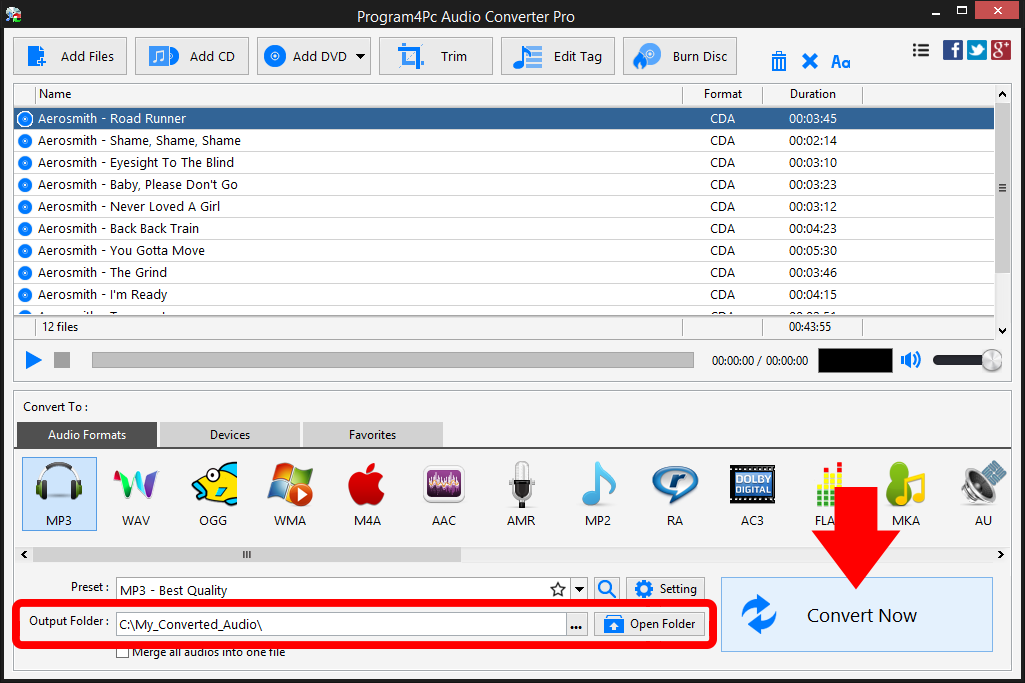
After ripping the audio CD, all audio tracks will be listed in the main list and ready to convert. From output section of program select your desire audio file format. If you ever need to convert your audios to listen via iPhone or another mobile device, Program4Pc Audio Converter can help you for that as well. Just click on Devices tab for available devices and locate your device's brand and model to find a preset that's 100% designed for your particular device.
Specify the folder where the program should place your converted files and click the Convert Now button.
That's it!
Now that you're finished, and that's all about using Program4Pc Audio Converter to rip audio CD. Using this intuitive software, you can easily convert your favorite audio CDs to any format and also be enjoying them on your cell phone or music player within minutes.
Download Audio Converter
Now that you're finished, and that's all about using Program4Pc Audio Converter to rip audio CD. Using this intuitive software, you can easily convert your favorite audio CDs to any format and also be enjoying them on your cell phone or music player within minutes.
See what else Program4Pc Audio Converter Pro can do for you:
- Convert audio file
- Convert DVD's audio
- Trim audio file
- Merge audio files
- Create and burn an audio CD
- Create and burn MP3 CD / DVD
- Convert video to audio
- Create ringtone for iPhone
- Edit audio tags