 |    | |
Home > Online Help > Audio Converter > DVD Converter
This tutorial explains how easily you may extract and convert DVD's audio with just couple of clicks.
Got lots of DVD videos you'd like to extract their audios and listen on your portable player or laptop? With the right program such as Program4Pc Audio Converter you'll be able to convert DVD's audio quickly and easily.
In this tutorial, we will show you how to use our Audio Converter for converting DVD files to any popular audio format, such as MP3, WAV, OGG, WMA, or RA, as well as how to extract music from your DVDs and play back on iPhone, Zune, Walkman and other portable devices.
Read this quick guide to find out how to convert DVD video format to audio.
Step 1: Install the Program4Pc Audio Converter on Your PC
Download Now
How to Convert DVD's Audio
This tutorial explains how easily you may extract and convert DVD's audio with just couple of clicks.
Got lots of DVD videos you'd like to extract their audios and listen on your portable player or laptop? With the right program such as Program4Pc Audio Converter you'll be able to convert DVD's audio quickly and easily.
In this tutorial, we will show you how to use our Audio Converter for converting DVD files to any popular audio format, such as MP3, WAV, OGG, WMA, or RA, as well as how to extract music from your DVDs and play back on iPhone, Zune, Walkman and other portable devices.
Read this quick guide to find out how to convert DVD video format to audio.
Step 1: Install the Program4Pc Audio Converter on Your PC
Download Now





Step 2: Open DVD and Convert Its Audio

 To open DVD and extract its audio, run Audio Converter software and click the Add DVD button on top of program interface.
 The drop-down menu opens and ask you to choose either between a DVD drive or browse to Load DVD Folder.
To load DVD folder simply select a folder containing DVD files and all audios will be extracted from DVD's video and listed one by one in program automatically.
Step 3: Choose Audio Format and Convert
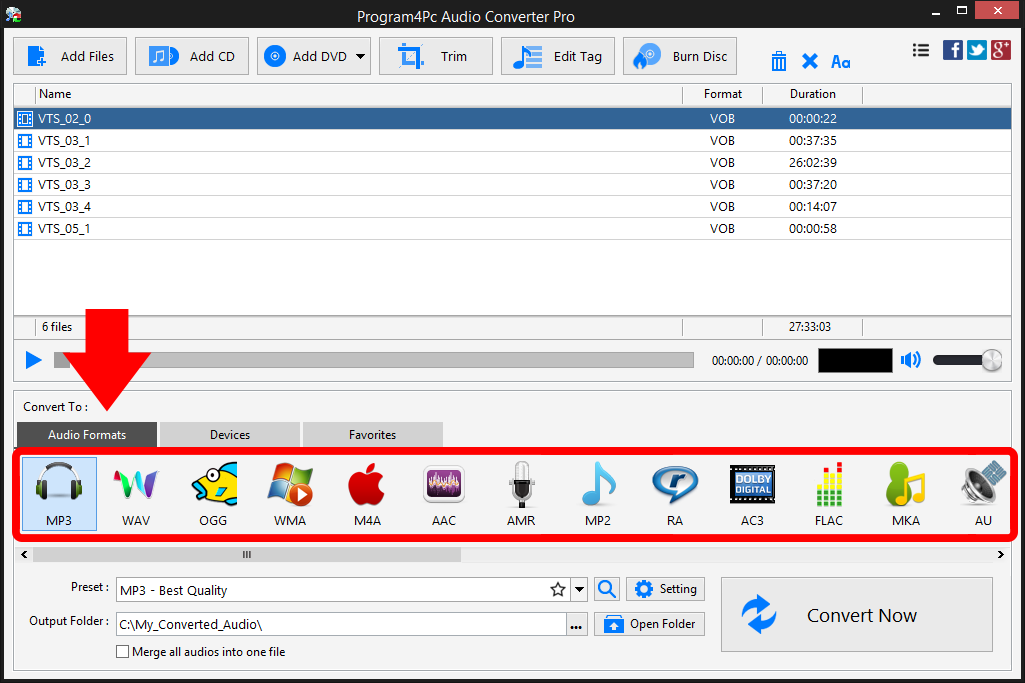
Now all DVD's audio are listed and ready to convert to any format you like. Select your desire audio file format from Convert To section of program. If you would like to convert your DVD to audio and listen via iPhone or another portable player, click the Devices tab for available devices and locate your device's brand and model to find a preset which designed for your particular device.
Step 4: Set the Output Folder and Start the Conversion
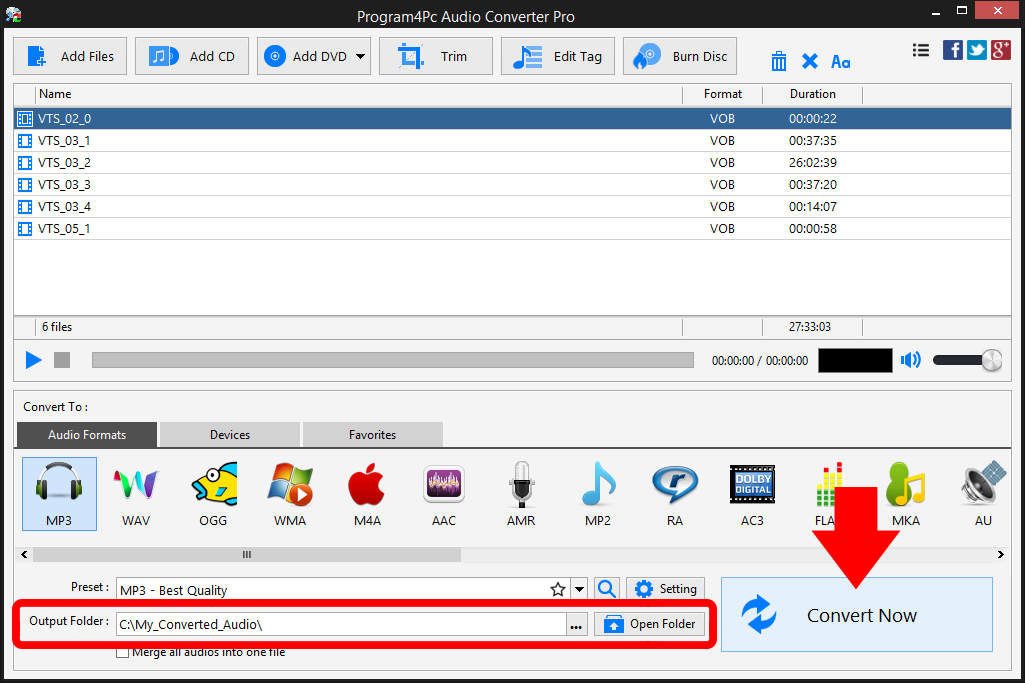
Now it’s time to choose the folder where your converted audios will be saved. Specify the output folder in Output Folder field or stay with the default folder. All the necessary settings are now specified, so you can start converting your audios. Just click Convert Now, and wait for the process to finish. After the conversion is complete, you will be asked by program to open the folder containing the finished audios.
That's it!
Converting DVD to audio has never been easier with Program4Pc Audio Converter, and you did it in just a couple of clicks. Using this intuitive software, you can easily convert your favorite DVD's audio and enjoy them on your cell phone or music player within minutes.
Download Audio Converter
Converting DVD to audio has never been easier with Program4Pc Audio Converter, and you did it in just a couple of clicks. Using this intuitive software, you can easily convert your favorite DVD's audio and enjoy them on your cell phone or music player within minutes.
See what else Program4Pc Audio Converter Pro can do for you:
- Convert audio file
- Rip audio CD
- Trim audio file
- Merge audio files
- Create and burn an audio CD
- Create and burn MP3 CD / DVD
- Convert video to audio
- Create ringtone for iPhone
- Edit audio tags