 |    | |
Home > Online Help > Audio Converter > MP3 CD and DVD Burner
This tutorial explains how easily you may create and burn MP3 and WMA CD / DVD with just couple of clicks.
Listening to favorite music collection is one of the best joys in the life, it takes you back to lovely moments, refresh your memories and makes you feel good. To have your music collection everywhere, you need to burn it on CD and DVD and play it back via players which supports special audio formats like MP3 and WMA, because not all audio formats are recognizable in players.
Audio Converter Pro will create and burn CD and DVD which includes only supported MP3 and WMA audio files and you will be rest assure your favorite songs are playable everywhere.
Step 1: Install Audio Converter Pro
Download Now
How to Create and Burn MP3 and WMA CD / DVD
This tutorial explains how easily you may create and burn MP3 and WMA CD / DVD with just couple of clicks.
Listening to favorite music collection is one of the best joys in the life, it takes you back to lovely moments, refresh your memories and makes you feel good. To have your music collection everywhere, you need to burn it on CD and DVD and play it back via players which supports special audio formats like MP3 and WMA, because not all audio formats are recognizable in players.
Audio Converter Pro will create and burn CD and DVD which includes only supported MP3 and WMA audio files and you will be rest assure your favorite songs are playable everywhere.
Step 1: Install Audio Converter Pro
Download Now





Step 2: Open the Audio Converter and load CD or DVD Burner
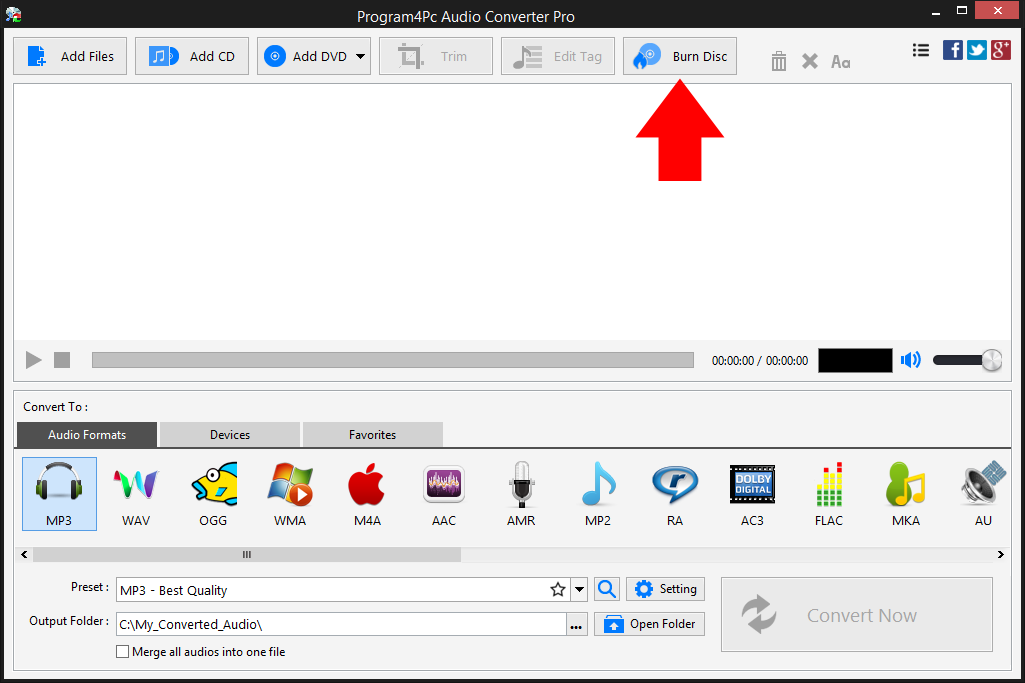
 Open Audio Converter software and click the Burn Disc button in the top of the program interface.
 Step 3: Select CD / DVD Burner
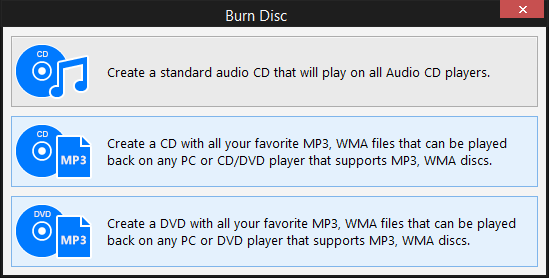
In the newly opened window, Click the second button Create a CD with all your favorite MP3, WMA files... if you would like to create MP3 and WMA CD. But if you need to create and burn MP3 and WMA on DVD then click the Create a DVD with all your favorite MP3, WMA files... button instead.
Step 4: Add Files and Create MP3 CD or DVD

Insert a blank disc (CD-R, CD-RW, or writable DVD) in the drive, if your disc has already some data then can be erased easily (if necessary). Click the Add Files button in the upper left corner of the CD/DVD Burner interface and select the files you want to burn.
The program will calculate and show the total space used and free space available on disc in the lower section of application interface, so you can configure the files to be burned on disc. When you are done, click the Burn to disc button to start the process.
Program4Pc Audio Converter will create MP3 and WMA CD/DVD with all your favorite MP3, WMA files that can be played back on any PC or CD/ or DVD player that supports MP3, WMA discs.
That's it!
And that's all about using Program4Pc software for creating and burning MP3 CD and DVD! Now, anytime you want to create MP3 and WMA disc, just run Program4Pc Audio Converter and follow these steps.
Enjoy your favorite music collection everywhere!
Download Audio Converter
And that's all about using Program4Pc software for creating and burning MP3 CD and DVD! Now, anytime you want to create MP3 and WMA disc, just run Program4Pc Audio Converter and follow these steps.
Enjoy your favorite music collection everywhere!
See what else Program4Pc Audio Converter Pro can do for you:
- Convert audio file
- Rip audio CD
- Convert DVD's audio
- Trim audio file
- Merge audio files
- Create and burn an audio CD
- Convert video to audio
- Create ringtone for iPhone
- Edit audio tags